


How to connect to a wireless network in Windows XP
The below example uses the Windows XP Wireless Zero Configuration tool in order to connect to a wireless network:
1. 1. Windows will automatically flag a message to saywhen a wireless network is within range:
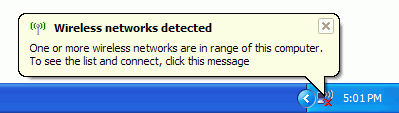
2. 2. To connect to one of the available wirelessnetworks, simply right click on the wireless icon down by the clock and thenleft click View Available Wireless Networks:
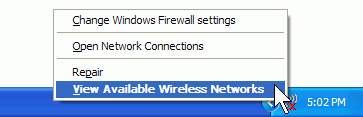

3. 3. A Wireless Network Connection window will nowappear, displaying all the currently available wireless networks within reach.Click on the network you wish to connect to and click connect:
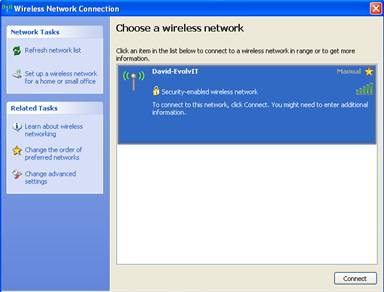
4. 4. You will now be prompted to enter a security key if the wireless network you are connecting tois security-enabled. Type in the encryption key in both the Network Keyand Confirm network Key boxes, thenclick Connect.
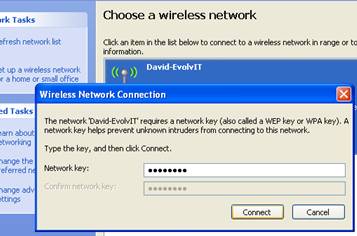
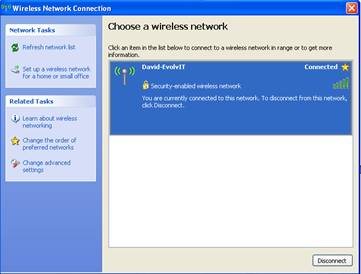
5. 5. Windows XP will now try to connect your machineto the wireless network. If it fail’s you be asked to re-enter the security key.If your machine successfully completes the connection progress you will see theword connected next to the networkname:
We all rely so heavily on our Internet and Wi-Fi connections these days, imagine how frustrated you felt the last time you lost either…or both! This is where Evolvit come in, we are a trusted outsourced IT Services provider in Bristol working with many companies across the region and supporting them to ensure they remain functioning even when they have IT or power issues. Get in touch and speak to one of the team to find out how we could help your business stay one step ahead.