


How to disable user account control in Windows 7
1. Click on the Start button.
2. Click on Control Panel.
3. Click User Account and Family Safety.
4. Click User Accounts.
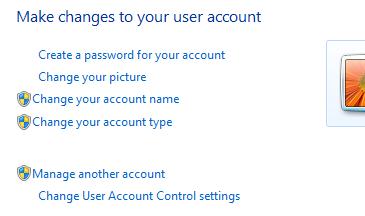
5. Click Change User Account Control Settings.
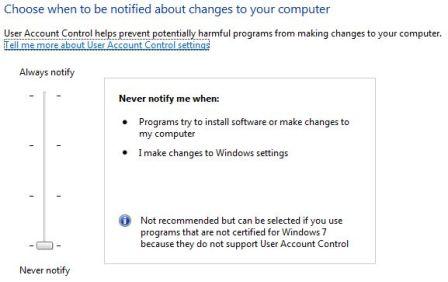
6. Slide the slider bar to the lowest value (towards Never Notify), with description showing Never notify me.
7. You will be prompted to reboot your computer. Do so when ready.
In order to re-enable UAC just select the above checkbox and reboot.
When it comes to most computer issues, our Bristol computer support technicians can remote access your computer and have it fixed very quickly. Allowing you to get back to your work with the minimum of disruption.