


How to disable User Account Control in Windows Vista
1. Click on the Start button.
2. Click on Control Panel.
3. Click User Account and Family Safety.
4. Click User Accounts
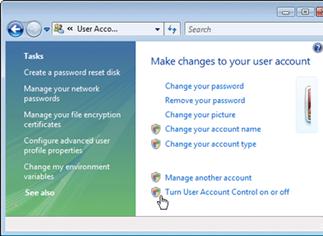
5. Click Turn User Account Control on or off.
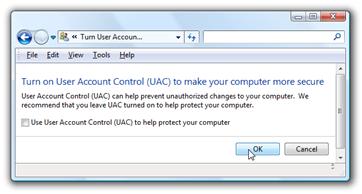
6. In the “Turn on User Account Control (UAC) to make your computer more secure” click to unselect the “Use User Account Control (UAC) to help protect your computer”. Click on the Ok button.
7. You will be prompted to reboot your computer. Do so when ready.
In order to re-enable UAC just select the above checkbox and reboot.
It Outsourcing is a great way to reduce your IT overheads whilst still maintaining a quality service. Evolvit offer the some of the most competitive SLAs of all outsourced IT companies in Bristol. We’re happy to talk through your requirements and to see if we’d be a good fit for you and your business.