


How do I turn on Microsoft Updates?
With vulnerabilities being discovered regularly in all software, not just Windows, it’s important to ensure that you have enabled auto-updates from within Control Panel.
Follow the simple guide below to ensure you stay safe. This is just some of small business IT support services we offer to businesses across Bristol.
To turn on Automatic Updates in Windows XP (SP2)
1. Click Start, and then click Control Panel.
2. Click Automatic Updates.
3. Choose Automatic (recommended).
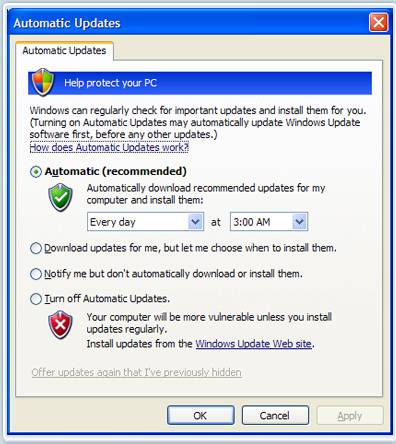
4. Set a time in the drop box for when your PC should automatically check
5. Click Ok